At present there is NO WAY to see what has been checked and what hasn't. Since the entire validity of the database depends on whether the records are accurate and Peter is so adamant that users should be checking how does anyone know whether they have checked their records or not.
Okay, so for my first post(!) I thought I'd show what I do for checking. I have used FTAnalyser to successfully upload somewhere in the region of 5-6,000 records, and am slowly working my way through checking them, one by one for accuracy. I don't believe that just checking the first or head entry is enough, as probably 50% of my records are incorrect and need editing. This is not necessarily FTAs fault but actually mine, as I have successfully expanded and proven the full names of my records by checking various censuses, BMD register entries, certificates etc. etc. so I have a lot of middle names to go with my christian names. In the 1881 census it is mainly christian names plus an occasional Initial for middle name. FTA will submit my full christian and middle name and the entry will be incorrect as far as LostCousins is concerned. SO I have to check each record.
I have two windows open - Ancestry on the left, showing my tree and LostCousins on the right showing MyAncestors:
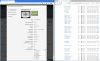
On my Ancestry tree I search for the oldest person in the family group shown on the right e.g. Thomas Eggleston. I then view the census entry for the 1881 census. This then shows all the members of the household and their ages.
If you look at the list of MyAncestors on the LostCousins screen, you will see a logo alongside each name that has been entered by FTA. Initially I thought this was an FTA logo added by FTA, but have recently realised it just shows that there are notes on the record. Up until now I have done the Following:
Click on the first name that needs checking (cos it's got the logo). Then on the edit screen amend the record so it shows the correct info from the census record on the left screen. At the bottom of the edit screen is a notes section. In this notes section it says "Added_By_FTAnalyzer". I delete this text and click the SAVE button to save the record. After a little while MyAncestors comes back to the point I was at previously and the logo alongside the name has gone. This is how I know that I have checked, edited and saved the record. Anything that has the logo still needs checking. I then check the next record in the household etc.
The only thing I was not happy about doing it this way was removing any reference to Alex's brilliant program! So here's my new idea, instead of deleting "Added_By_FTAnalyzer" I position the cursor at the beginning of the text and press WINDOWS-KEY + . - This brings up (on Windows 10) the Emoji panel. I select the Thumbs Up and paste it in to the notes section before the existing text. Now click save. When MyAncestors refreshes the list will look the same. HOWEVER, if you move the cursor over the logo, you will now see the following:
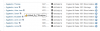
This shows that the record was uploaded by FTAnalyzer (yay!) AND that it has been checked, edited and saved.
So in future, all I have to do is move the cursor over the logos to find the next item to check.
I have never used the "Arrow Key" to check the entries on FMP as I find it a lot easier to use Ancestry. This also ensures that I am using the correct transcription. Any possible solution involving the "Arrow Key" would I'm afraid be useless to me. By utilising my approach I can show that a record has been checked and it doesn't involve any re-programming on the MyAncestors page.
Alexander, I don't honestly think that you can make things much easier for checking, the more accurate a persons GEDCOM is the more likely a record will have to be edited. I know I'm going to have to check individually every record that FTA has uploaded and I am happy to do that. It's just going to take forever!
I am open to any suggestions that may help to fine-tune this.
Dale



