• Only registered members can see all the forums - if you've received an invitation to join (it'll be on your My Summary page) please register NOW!

  • If you're looking for the LostCousins site please click the logo in the top left corner - these forums are for existing LostCousins members only.
  • This is the LostCousins Forum. If you were looking for the LostCousins website simply click the logo at the top left.
  • It's easier than ever before to check your entries from the 1881 Census - more details here

Browser Tabs and Short Cuts

It is a true KEYBOARD shortcut, however if you click on the, almost invisible until you hover over it, little vertical bar to the right of the clock in the bottom right hand corner it will do the same thing. An example of where there is a mouse click and a keyboard click for the same thing both of which are shortcuts to minimise all your windows in one go and depending on whether you are a keyboard or mouse person depends on which you think of as a shortcut.
Do you know as soon as I began reading your post it all came back to me from the dim and distant past, yes the little rectangle to the right of the clock does the same thing. That is lovely proof if ever one was needed that it is the thing you know best (in my case WIN+D) is the true short cut, even if others might argue clicking the little rectangle is far easier.

I own to being a mouse person as may be obvious from my posts but on occasion a keyboard short cuts stays with me; a good example being WIN+E to bring up Windows Explorer rather than the round the garden path method of Start-Computer; yet to many that is the obvious route.
 
Alexander I haven't got a little verticle bar to the right of the clock in the bottom right hand corner, there is nothing there ?:( I love the CTRL + F so thanks for that.
I have one computer still with Vista and that has no vertical bar alongside the clock but both my Windows 7 computers do have. My Windows 8.1 laptop which has the Classic Shell overlay also shows the bar or (as Alexander says) it appears when you pass your mouse over it. Not sure whether the normal Win 8 start screen sports the vertical bar so perhaps others will comment on this. However in all cases WIN+D will take you to the Desktop.
 
Alexander I haven't got a little verticle bar to the right of the clock in the bottom right hand corner, there is nothing there ?:( I love the CTRL + F so thanks for that.

Heather, neither do I have the bar decribed by Alexander, but I do have a blue rectangular box at the bottom left of the screen, next to the Windows Start symbol. If I hover the pointer over that blue box it shows "Show Desktop" and works the same way.
 
I've printed them out.
Good luck with that as it made me recall that a few years back (poetic licence about how long ago) a Computer magazine produced a whole supplement of Computer Keyboard (& Mouse) short-cuts which I dutifully kept by with the intent to practice each in turn. The ones that appealed - like for example CTRL+C & CTRL+V - and a few others such as CTRL-Home -CTRL-End stayed with me and the rest were largely ignored. Then over time I would learn of a short cut that really appealed (it may have been in the original list and ignored, who knows) but this time I would realise its significance and use it time and again until it became second nature. Once you believe in a short cut and it works for you, then it is truly a short cut. But for everything else and until you too have the epiphany moment, do as the poster suggests 'Stay Calm & Carry on';)
 
WIN+E brings up Computer with me (Windows 8), not Windows Explorer
Same thing; the box headed Computer opens in Windows Explorer (what the E stands for) -and not to be confused with Internet Explorer. I do believe however that Windows Explorer has or is about to be given a new name (from Windows 8 onwards) but the CTRL+E will still stand as a short cut.
 
I do believe however that Windows Explorer has or is about to be given a new name (from Windows 8 onwards) but the CTRL+E will still stand as a short cut
Yes it is now called File Explorer and performs exactly as before as a GUI (a window in other words) to allow anyone to access files & drives on the Computer. It can also be accessed with the mouse via the Start Menu & clicking on Computer.
 
Same thing; the box headed Computer opens in Windows Explorer (what the E stands for) -and not to be confused with Internet Explorer. I do believe however that Windows Explorer has or is about to be given a new name (from Windows 8 onwards) but the CTRL+E will still stand as a short cut.
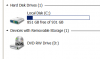
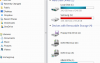
Of course I meant Windows 7!!!!! Sorry about that. But how can Windows Explorer be the same as Computer, which gives me this when I click on it?
upload_2015-4-29_15-29-23.png upload_2015-4-29_15-26-2.png
Whereas Windows Explorer gives me this:
upload_2015-4-29_15-29-23.png
 
I got in a mess with that reply so I hope it's come out OK. I wanted to add that I'm not doubting you, Bob. I wouldn't dare. But perhaps you could explain. Also, I hasten to add that I'm not confusing Windows Explorer and Internet Explorer, even if I confused Windows 8 and 7. Can't think why I did that.
 
Alexander I haven't got a little verticle bar to the right of the clock in the bottom right hand corner, there is nothing there ?:( I love the CTRL + F so thanks for that.
Are you using Windows 7 or above? I don't recall if it existed on XP and of course Macs are totally different shortcuts on a Mac typically involve the Apple key.
 
Heather, neither do I have the bar decribed by Alexander, but I do have a blue rectangular box at the bottom left of the screen, next to the Windows Start symbol. If I hover the pointer over that blue box it shows "Show Desktop" and works the same way.
Well, well what do you know, the rectangle has changed sides.:( So this means it must be a customisable option. In my own setup the option (called Aero Peek by the way) states the desktop button will be displayed at the end of the taskbar; but doesn't say which end. You can opt in or out by ticking a box. Perhaps in Heather's case (if she does not have the rectangle on the left) she needs to right click the task bar, and choose properties and then make sure she has a tick in the box 'use aero peek to preview the desktop'. Hopefully then the rectangle should appear but whether right or left is in the lap of the gods.

I know the Taskbar Notification area can be customized (to use the US preferred 'z') so perhaps somewhere in the labyrinth of what can and can't be achieved, lies the answer as to which end the desktop notification appears. Good luck with that but if it was left to me I would stick with WIN+D.
 
Of course I meant Windows 7!!!!! Sorry about that. But how can Windows Explorer be the same as Computer, which gives me this when I click on it?
View attachment 805 View attachment 804
Whereas Windows Explorer gives me this:
View attachment 805
Windows Explorer lets you explore files and folders your computer has access to. The Library view (Documents, Music etc) is just a folder that can often be the default. If you look on the right hand side you will still be able to browse to My computer. So it doesn't matter what view opens first its still Windows Explorer that is used to browse files your computer has access to.
 
I got in a mess with that reply so I hope it's come out OK. I wanted to add that I'm not doubting you, Bob. I wouldn't dare. But perhaps you could explain. Also, I hasten to add that I'm not confusing Windows Explorer and Internet Explorer, even if I confused Windows 8 and 7. Can't think why I did that.
I seem to have made a couple of goes at explaining already Gillian, but for you here is something more comprehensive (you may regret asking of course). From Windows 95 onwards Microsoft introduced Windows Explorer (ironically before that it was named File Manager and so its new incarnation as File Explorer is almost a reversion in name). However sticking with Windows Explorer this was known as a GUI (Graphical User interface) which is another name for an internal Window which when opened permitted the user to inspect all the files and drives on the Computer.

In later versions of 'Windows (not sure about XP as I no longer have it to check, but certainly from Vista onwards) Microsoft tended not to use the term Windows Explorer (except within its more technical advice features) as I think they wanted to distant it from its similar sounding Internet Explorer. So instead directed users to access files by clicking on Start and selecting Computer which came up labelled as such. But the point to make is that the Window (or shell) headed 'Computer' is one and the same as if it was opened as Windows Explorer, or now File Explorer. There should be no difference in using the Start/Computer access or WIN+E; what comes up should be one and the same (or at least it is on both my Windows 7 computers).
 
Windows Explorer lets you explore files and folders your computer has access to. The Library view (Documents, Music etc) is just a folder that can often be the default. If you look on the right hand side you will still be able to browse to My computer. So it doesn't matter what view opens first its still Windows Explorer that is used to browse files your computer has access to.
Nice and succinctly put as always Alexander and I direct Gillian to read your answer which says in a few words what mine purports to say in many more.
 
Last edited:
But how can Windows Explorer be the same as Computer, which gives me this when I click on it?
Just read your print screens and what should show as a left and right pane containing both sets of information doesn't for some reason (You must have the Finish version -only joking):) I think you need to change your settings from the View toolbar in Windows Explorer (OK Computer if you prefer) and then remember whatever is highlighted in the left hand pane will show in detail in the right. So if the left shows Computer then your hard drives will show on the right. If you select (say) Documents, then you get a list of documents on the right. Perhaps Alexander can explain what you need to do -if anything of course.
 

Attachments

  • upload_2015-4-29_14-20-25.png
    upload_2015-4-29_14-20-25.png
    61 KB · Views: 4
Last edited:
I'm beginning to wish I'd kept my mouth shut! :( Thank you all the same, Bob and Alexander, but I'll think I'll chug along as I have until now, without clicking on WIN + E.
 
I'm beginning to wish I'd kept my mouth shut! :( Thank you all the same, Bob and Alexander, but I'll think I'll chug along as I have until now, without clicking on WIN + E.
Exactly the sentiment I was trying to make all along - stay with what you know best:)
 
Back
Top