
-
Only registered members can see all the forums - if you've received an invitation to join (it'll be on your My Summary page) please register NOW!
-
It's easier than ever before to check your entries from the 1881 Census - more details here
You are using an out of date browser. It may not display this or other websites correctly.
You should upgrade or use an alternative browser.
You should upgrade or use an alternative browser.
Ancestry's Family view
- Thread starter PhilGee
- Start date
A
At home in NZ
Guest
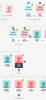
My family view doesn't have those annotations etc How do I find the Beta version?Just noticed the "arrow boxes" and other annotations on the family view (Beta). First thoughts are it doesn't add much, though the ability to "hide siblings" could be useful.


PhilGee
LostCousins Member
It just appeared for me - possibly a random selection of users.
I have already reported a problem: it just happened that I moved to a person in the tree that caused a few aunts/uncles to be placed on top of each other. Changing the focus to a sibling retained the problem but changing generation cleared it. It was repeatable and within a pedigree collapse area.
Edit: I checked another pedigree collapse area and the fault did not appear! However, the error occurred where direct ancestors formed the collapse but not where direct ancestors were outside the collapse.
I have already reported a problem: it just happened that I moved to a person in the tree that caused a few aunts/uncles to be placed on top of each other. Changing the focus to a sibling retained the problem but changing generation cleared it. It was repeatable and within a pedigree collapse area.
Edit: I checked another pedigree collapse area and the fault did not appear! However, the error occurred where direct ancestors formed the collapse but not where direct ancestors were outside the collapse.
Last edited:

Helen7
LostCousins Superstar
It hasn't appeared for me, but looking at your screenshot, I'm not bothered if it never does!It just appeared for me - possibly a random selection of users.
A
At home in NZ
Guest
Me neither and I HOPE it never does. It appears to be yet another dumbing down enhancement. Telling me how somebody is related when it's all in plain sight - give me strength!It hasn't appeared for me, but looking at your screenshot, I'm not bothered if it never does!

A
At home in NZ
Guest
I am not likely to get a DNA match suggestion as I haven't done my DNA.Just noticed a couple of "new" (to me) symbols in Ancestry's family view: View attachment 2089 View attachment 2090 The first suggests a DNA match who has a private tree, the second lists multiple spouses with "on/off" switching.
So far I am only getting the new look 'shaky leaf' and when I click on it, it shows the number of hints for the person.
The new look 'shaky leaf' looks exactly the same as what you are describing as multiple spouses. Makes me wonder, if it's a multi purpose symbol.
PhilGee
LostCousins Member
Just checked the "overlay" problem originally mentioned (in my second post) and that has been cleared - and I noticed another "thrulines" symbol  , but its purpose seems to be to identify all direct ancestors in the Thrulines range - but none of any links. It may useful for many, but I already have my direct ancestors highlighted with a "profile" image, so it has no benefit for me.
Phil
, but its purpose seems to be to identify all direct ancestors in the Thrulines range - but none of any links. It may useful for many, but I already have my direct ancestors highlighted with a "profile" image, so it has no benefit for me.Phil


PhilGee
LostCousins Member
Thanks for Ancestry's descriptions, Tim. I was too lazy to look for them!
Number 1 is as I thought - every DNA match is related to you through nearest common ancestors (NCAs). It therefore follows that all your direct ancestors both above and below NCAs are also related to the match. Looking at the Pedigree view of my tree, every direct ancestor up to 4th great... has the symbol. I have 3 matches that, between them, share 50% of my direct ancestors from 2GT level.
Number 2 - I will have to hunt for these as I believe all known matches that would have this symbol have already got symbol Number 3 (and my corresponding "DNA Match" profile image).
Number 1 is as I thought - every DNA match is related to you through nearest common ancestors (NCAs). It therefore follows that all your direct ancestors both above and below NCAs are also related to the match. Looking at the Pedigree view of my tree, every direct ancestor up to 4th great... has the symbol. I have 3 matches that, between them, share 50% of my direct ancestors from 2GT level.
Number 2 - I will have to hunt for these as I believe all known matches that would have this symbol have already got symbol Number 3 (and my corresponding "DNA Match" profile image).
A
At home in NZ
Guest
OH, didn't even notice the triple line, thanks for the explanation.Ah, typically I go for brevity over clarityThe second symbol was the "triple line" on the left corner of the second image!
I also omitted (it was subconsciously ignored) the fact that I am back on a BETA version - with show/hide descendants options.
As for the Beta version, aren't you the lucky one
