
• Only registered members can see all the forums - if you've received an invitation to join (it'll be on your My Summary page) please register NOW!

  • If you're looking for the LostCousins site please click the logo in the top left corner - these forums are for existing LostCousins members only.
  • This is the LostCousins Forum. If you were looking for the LostCousins website simply click the logo at the top left.
  • It's easier than ever before to check your entries from the 1881 Census - more details here

Version 3.7.1.1 installation issue.

Norman

LostCousins Member
I have used FT Analyzer in the past but not much recently. I decided I'd better upgrade to the latest version and thought I ought to uninstall the old versions, including a beta version of 2 before I begin.

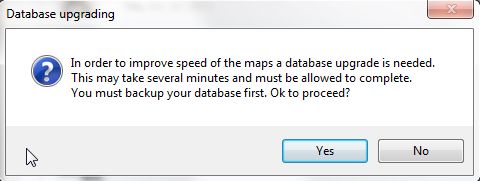
I uninstalled both the beta and older version through Windows Control Panel and installed the latest version. On running v3.7.1.1 for the first time I was informed that I need to update the database

capture432.jpg
capture43.jpg


Obviously the un-install does not remove the database.

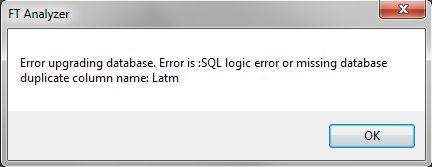
I agreed to the upgrade and the old version was backed up however when I run the application I get the following error.
capture42.jpg


This sequence happens every time I run the application until I answered NO to upgrading the database. The application now loads without an error message. Thought it worth reporting.
 
Ah ok that's useful info can you email me the database via PM on forum so I can work out where the issue lies and add a fix for this problem. How much of a problem it is would be down to how much work you'd done on locations in the old version if not a lot then it won't be a problem. However as you say its worth reporting and worth fixing.
 
Thanks Norman, you have no location data in that database so a fresh database will work fine as you are losing nothing. The issue was a typo in the version numbers for upgrade where it was trying to upgrade the database when your version already had the changes. Fixed for v3.7.1.2.
 
The backup question came up every time I started FTA and I replied "yes" each time. The backup file name/location was the same each time so it got overwritten each time it backed up. Perhaps the second backup was of the freshly created new database with no data. There was certainly data in the old database after I had run the Geocoding in the beta version of FTA.
 
Ah yes the original file would have the data, the backup you did with the working system would have had a default empty database. The fix should allow you to run the program and restore your former database.
 
The original backup will have been overwritten by subsequent backups. I'm not concerned now though as I've run the Geocoding again and now have an up-to-date database. Took an age though to create 1384 locations.
 
Ok no problem. Good idea to do a backup of that post update file and name it appropriately so you know it's the good one.
 
Back
Top