• Only registered members can see all the forums - if you've received an invitation to join (it'll be on your My Summary page) please register NOW!

  • If you're looking for the LostCousins site please click the logo in the top left corner - these forums are for existing LostCousins members only.
  • This is the LostCousins Forum. If you were looking for the LostCousins website simply click the logo at the top left.
  • It's easier than ever before to check your entries from the 1881 Census - more details here

Version 3.7.0.0 Released

Alexander Bisset

Administrator
Staff member
I've released version 3.7.0.0 with the following new features:

Added US, Canadian and Irish Colour census reports
Age facts that give a calculated birth add a calculated birth fact
Add support for Alias fact type
Added option to display alias in name displays

As well as the following updates to existing features:
Add filter to remove someone from colour report who was never in country
Show preferred fact status on fact report
Armed Services and At Sea UK census now included on colour census report as part of relevant UK census - needs appropriate census ref to work
Colour Census now filters out records where person is too old to be on census but death date is unknown
 
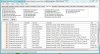
I don't know if this is important but if you look at the error report (Capture.jpg) below the first 2 and the last 2 are the same.
 

Attachments

  • Capture.JPG
    Capture.JPG
    190.5 KB · Views: 9
Yes it is an artefact of a change in v3.6.1.0 when I marked facts before birth and after death as error facts so they didn't show up in the census reports etc. I could change the error display so they only show once. I wasn't sure if showing them just once was a good thing or not though?
 
V3.7.0.0 installed and two issues noticed immediately.

1. The saved column information (positions, widths, row sort order) has been lost. Also the last column (Ahnentafel) is very narrow and poses difficulty in moving to the left.
2. Many new Orange boxes have appeared when there is no LC entry recorded.
 
Saved column info is lost as there are LOTS of new columns for the other census years hidden to only show selected country. So unfortuantely it had to ignore saved column widths etc as the column numbers had all changed and the risk of getting it wrong was too high hence a revert to default.

Last column too narrow I'll look at.

Many new orange boxes is odd I suspect it could be an artefact of country handling. Have you got an example GEDCOM please? In particular I need the CENS PLAC fact that goes with the Lost Cousins fact year however since this is showing as missing that might not be that obvious in which case the individual would be useful. You can send by PM if you'd rather not post details in forum.
 
I will try to sort out some appropriate GEDCOM entries and send to you but in the meantime please note that all ORANGE boxes are for LC years (1841, 1881, 1911) and were all previously RED with no corresponding LC entry/fact.
 
Try the following GEDCOM file. It should show 2 ORANGE boxes which were previously RED.

Code:
0 HEAD

0 @ind00001@ INDI
1 NAME Forename /Surname/
2 GIVN Forename
2 SURN Surname
1 SEX F
1 EVEN
2 TYPE Lost Cousins
2 DATE 1841
1 BIRT
2 DATE 12 MAY 1840
2 PLAC Aldgate, Middlesex, England
1 BAPM
2 DATE 12 JUL 1840
1 DEAT Y
1 SOUR @source00025@
2 PAGE Class: HO107; Piece: 725; Folio: 6/52; Page: 28;
1 SOUR @source00068@
2 PAGE Class: HO107; Piece: 1550; Folio: 355; Page: 45;
1 SOUR @source00102@
2 PAGE Class: RG09; Piece: 2626; Folio: 11; Page: 16;
1 CENS
2 DATE 06 JUN 1841
2 PLAC Minories New Square, St Botolph Without Aldgate, Middlesex, England
2 SOUR @source00025@
3 PAGE Class: HO107; Piece: 725; Book: 6; Folio: 52; Page: 28;
1 CENS
2 DATE 30 MAR 1851
2 PLAC 12 Lower Turning, St Paul Shadwell, Middlesex, England
2 SOUR @source00068@
3 PAGE Class: HO107; Piece: 1550; Folio: 355; Page: 45;
1 CENS
2 DATE 07 APR 1861
2 PLAC 34 Seller Street, Chester, Cheshire, England
2 SOUR @source00102@
3 PAGE Piece 2626, Folio 11, Page 16

0 @source00025@ SOUR
1 TITL HO107/725/6/52/28 @@ 1841 UK census
1 PUBL Publication Date: 06 JUN 1841
2 CONT Media: Census

0 @source00068@ SOUR
1 TITL HO107/1550/355/45 @@ 1851 UK census
1 PUBL Publication Date: 30 MAR 1851
2 CONT Media: Census

0 @source00102@ SOUR
1 TITL RG09/2626/11/16 @@ 1861 UK census
1 PUBL Publication Date: 07 APR 1861
2 CONT Media: Census

0 TRLR
 
Alexander, Bryman is correct. I've sent you my latest gedcom

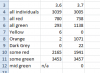
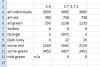
Here's a comparison between 3.6 beta 5 and 3.7 for all types on the same gedcom file.

Capture.PNG
 
Thanks guys, it was checking the country and saying orange if it was UK rather than saying Orange if it was UK AND a valid Lost Cousins fact. So it was orange if you had any UK fact for that person.
 
Interesting as to why it affected the "all individuals", dropped it by 34.
 
There's an extra filter added due to the introduction of countries, anyone known to have been out of country (eg: UK) for ALL census is now filtered out too. So if for example you have someone born in US, Canada, Continental Europe etc, with no UK facts they will be filtered out of the UK census report as unlikely to appear on a UK census. This logic then works well for US based trees so it filters the UK report to just those UK based entries and the US report to just those US based entries etc.

When I first created the countries I noted when looking at the report it was strange to see lots of entries where EVERY entry was "likely to be out of country" I thought it best to filter these and the result is a more usable report.

BTW v3.7.0.1 now released with the fix for the excess vitamin C from the oranges.
 
Yes, I have it, won't be catching scurvy for a while!!

Capture.PNG

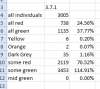
Here's the detail for 3.7.1, and I guess the missing 34 people are out of the country now. Yellows and Oranges now look fixed.
 
Note the increase of "all green" was a bug fix where it was only previously showing ones that were all green with no Lost Cousins greens ie: there are two green status - census not LC year (code=3), census and LC fact for year (code=4). It was only showing ones where it was all code=3, it now shows ones code=3 or 4.
 
Thank you, it does make my figures look better :)

Hmmm, what about a small summary report on the main Tab? Using the all individuals as the root then I would have

Capture.PNG

Maybe have a little tickbox to choose what country you want the report to display?

But if I have 3005 individuals, why do I have 3453 some greens? I can't have more than "all" can I? :confused:
 
It's because it added those with a code 3 and those with a code 4 together, some people have both thus seem to be appearing twice. I've added a distinct check. You can confirm you have duplicates by sorting by ID.

It was showing the top list then adding the second group to the end and not sorting again so you just got two lists added together. Distinct will filter out records that appear twice I've also reapplied the default sort on filtering. So that the two groups are properly sorted.

In your file "some green" has 2258 unique records and "all green" has 871 unique records.
 
Done a bit more research. There are duplicate entries in the "some green" report.

Capture.PNG
 
Oh dear. I'm sure my ancestor never dreamed of causing so much trouble when he went abroad to serve King and Country. :(

The entry in the 1911 UK Census is now being recognised although he was serving in South Africa but now the LC flag is ignored yielding YELLOW instead of GREEN. Presumably, another hiccup regarding country of residence? (using v3.7.0.1)
 
Oh dear. I'm sure my ancestor never dreamed of causing so much trouble when he went abroad to serve King and Country. :(

The entry in the 1911 UK Census is now being recognised although he was serving in South Africa but now the LC flag is ignored yielding YELLOW instead of GREEN. Presumably, another hiccup regarding country of residence? (using v3.7.0.1)

Yup it was checking what country the Lost Cousins fact was when it should have checked what country the corresponding census fact was. Fixed for v3.7.0.2.
 
Back
Top