Susan48
LostCousins Superstar
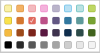
And no orange or yellow!Even more difficult to tell them apart!

And no orange or yellow!Even more difficult to tell them apart!
Yes - but why?And no orange or yellow!


I guess that's why they include a letter. Or rather, the first character of the description - it can be a number or a symbol (though I suspect there are some symbols that are disallowed).Moreover many of the new colours are very similar, which reduces their usefulness as a means of distinguishing different groups of matches.

Yes, I noticed that too. I wonder if they will eventually be updating the group colours on the individual match pages too. Otherwise it will be rather inconsistent.I noticed this morning (and maybe it was the case earlier), that although my main match lists show the new format with the square blobs and new colours, when I click to view a match it shows the old format with a round blob and the previous colours. Also, if I click to view shared matches then those are all showing in the old format too.
Good point, I'll need to bear that in mind when I edit my groups, as several have the same initial letters at present.I guess that's why they include a letter. Or rather, the first character of the description - it can be a number or a symbol (though I suspect there are some symbols that are disallowed).
This does make some sense now that my attention has been drawn to the text. I would still be much happier with a dark yellow than with no yellow at all, though.I imagine they have removed the paler colours as the white text shows up better on the darker colours.

It's probably more common than you think. But I suspect that colour-blindness was the main driver behind the original changes.Although synaesthesia is not very common I will be far from being the only Ancestry user who has a similar relationship with colours.


Same with me. No different and -classic at end of url.There was a rumour at the weekend that Pro Tools are being rolled out to Ancestry.co.uk this week - though I don't see anything different on my screen. What I did notice is that when I look at shared matches the URL ends in -classic
Yes, I have ".... or /..." for all matches where I haven't entered a relationship, as I mentioned in my first post in this thread.I am presuming that where it says "... or ...." that there hasn't been a relationship input for that individual and Ancestry is guessing.
There was a rumour at the weekend that Pro Tools are being rolled out to Ancestry.co.uk this week - though I don't see anything different on my screen. What I did notice is that when I look at shared matches the URL ends in -classic
Same with me. No different and -classic at end of url.
It would be really useful to see the cM shared by the other person in a shared match, as all I know at the moment is that it's >20 cM.
If I take match A who shares < 20 cM with me and click on 'Shared Matches', I get a list of people who all share >20 cM with me, and as I understand it, all share >20 cM with A. So I think your 8 cM on one side would be your 'A' and the other side would show how many cM they share with A (which is >20 cM). Apologies if this sounds confusing.The lowest shared cM I've seen on one side (not necessarily the other) is 8cM on one side of the match, but more than 20cM (in one case 21cM) for the other individual.
If I take match A who shares < 20 cM with me and click on 'Shared Matches', I get a list of people who all share >20 cM with me, and as I understand it, all share >20 cM with A. So I think your 8 cM on one side would be your 'A' and the other side would show how many cM they share with A (which is >20 cM). Apologies if this sounds confusing.
The upgrade to Pro Tools costs £4.99 a month. I'm considering whether to sign up for this.