• Only registered members can see all the forums - if you've received an invitation to join (it'll be on your My Summary page) please register NOW!

  • If you're looking for the LostCousins site please click the logo in the top left corner - these forums are for existing LostCousins members only.
  • This is the LostCousins Forum. If you were looking for the LostCousins website simply click the logo at the top left.
  • It's easier than ever before to check your entries from the 1881 Census - more details here

LostCousins facts with bad/missing census fact

PK-KTK

LostCousins Member
When I open the Lost Cousins tab, one of the lines that comes up is

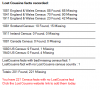
LostCousins facts with bad/missing census fact: 22

Yes, when I click the associated button and get the list of names etc, I can see people listed in there who have both Lost Cousins events and appear to have correct census events.

How can I check please what the actual census event is so that I can fix this error, because it's bugging me no end.
 
Doubling clicking on a line will bring up a list of Facts associated with that person.

In this example, you can quickly tell that a Lost Cousins fact has been created but there's no 1911 census record.

upload_2014-12-31_9-20-58.png
 
ahh but my fellow does have the census fact - hence my confusion


(and how are you getting your images within the post and not attached to the post like mine?)
 

Attachments

  • Capture.JPG
    Capture.JPG
    63.3 KB · Views: 5
You have a Census Fact and a Residence Fact for 1911? I think FTA checks to see if you have an equal amount of CENS/RESI Facts as Lost Cousins Facts.

So 1 CENS Fact (or RESI Fact) and 1 Lost Cousins is good, 1 CENS Fact + 1 RESI Fact (total 2 Facts) and 1 Lost Cousins is not good.

I use ALT + PrtScn to capture the window I want (making it the right size first) and then CTRL + V (paste) in this reply box.
 
Tim, I try to follow this thread, but all those acronyms are lost on an oldie like me! Please, please, please, think of us old luddites:(.
 
oh - ok - thanks - I'll double check for those things on my (long) list - that may well solve the issue
 
Yep, that's solved that person's issue - shall have to go through the other 21 now to fix those as well - thanks Tim!
 
Sorry Margery

FTA is FTAnalyzer, but I think you know that one? ;)

When you add a census record to a person, FHS (Family History Software) creates a Fact. A fact could be for a Birth, Baptism, Marriage, Death, Census, Occupation etc. The Facts are abbreviated (to 4 characters) when recorded in the gedcom (a file produced by your FHS to a recognised standard which can be shared between different FHS or used by FTA). So e.g. a Census fact becomes CENS, a Residence fact becomes RESI, Husband becomes HUSB.

Copy and Paste are 2 things that I do a lot of, I can highlight something from say an online Parish Record, copy it, and then paste that into a BAPTism fact that I have just added to someone in my tree.

There are a number of ways to Copy and Paste. After highlighting what you want to copy, a right click on the mouse could bring up a menu where you can select Copy. There is also a keyboard shortcut for Copy. On the bottom left of the keyboard is a button called Ctrl which is short for Control. If you press the Control button (keep it held down) and then press the C character on the keyboard, it will then have copied the highlighted text.

The keyboard shortcut for Paste is CTRL + V
 
Thanks, Tim. My new year resolution is to really get "into"my family history recording. As a self taught computerist (is that a word?) I take things really slowly. Anyhow, I have enjoyed the interaction with other forum members during the past year.
The 9pm fireworks on Sydney harbour have been a spectacular display but I doubt that I will be up for the midnight ones. Best wishes for 2015.
 
The 9pm fireworks on Sydney harbour have been a spectacular display but I doubt that I will be up for the midnight ones. Best wishes for 2015.
Margery, we watched both the Sydney and the Melbourne midnight displays on TV (two TVs) we may be biased (living in Melbourne) but we thought that the Melbourne ones were better than Sydney.:cool: That being said, Happy New Year to everyone.:D
 
Ok, new problem that I can't work out how to fix.

Entered the 1880 USA census for one baby and her family today and now I have
upload_2015-1-4_10-51-18.png
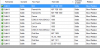
clicking either of the two buttons to check who and why, and then double clicking on the baby's name gives me
upload_2015-1-4_10-52-34.png

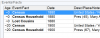
She does have those events in her time line
upload_2015-1-4_10-53-21.png

So why is she and only she) showing up the error?
Her parents and siblings with the same info don't show up the error

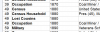
Father
upload_2015-1-4_10-54-36.png and upload_2015-1-4_10-55-25.png

She's also the 1 "missing" on the 1880 census line
 
Back
Top