
-
Only registered members can see all the forums - if you've received an invitation to join (it'll be on your My Summary page) please register NOW!
-
It's easier than ever before to check your entries from the 1881 Census - more details here
You are using an out of date browser. It may not display this or other websites correctly.
You should upgrade or use an alternative browser.
You should upgrade or use an alternative browser.
FTAnalyzer Download issue
- Thread starter Siobhan
- Start date


The download is a zip file. It sounds like the "Calibre" program (never heard of it) has grabbed the .zip extension and said it would deal with it. What sort of program is "Calibre"?

Its a library type program. Like ITunes for ebooks
Ah then Norman has probably hit the nail on the head. It is probably where to save the file that is the issue. If Siobhan can give some details as per Norman's suggestion then we can diagnose the issue further and provide a solution.

Siobhan
LostCousins Member
Operating system is Windows 7. Calibre is a program for downloading zip files of e-books. I use it for downloading files from sites such as Guttenberg for books for my kindle.Ah then Norman has probably hit the nail on the head. It is probably where to save the file that is the issue. If Siobhan can give some details as per Norman's suggestion then we can diagnose the issue further and provide a solution.
I did look to saving the file somewhere else but it did not give me an option to change where to place the download. Is the issue that I do not have another program for unzipping files? Thank you all for your suggestions so far. Any suggestions as to another program I can download and use for unzipping? This may give me another option other than Calibre when I click on download.

Norman
LostCousins Member
You don't need anything else to unzip the files. Windows 7 will do that for you, just open an Explorer window (not internet explorer but the one that shows you your files and folders on your PC) and find your way to where the zip file is. When you double click on the zip file it will open up and show you the files and folders within it.
Find, or create, a suitable place to run your FT Analyzer program from and then select all of the files and folders within the zip file and drag them to your new folder. You can then double click on the FTAnalyzer.exe file or create a desktop shortcut to run the program.
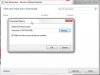
I'm guessing that you are using Internet Explorer when you downloaded the zip file and you need to change your download location or set it to ask every time you download anything. Press Ctrl+J and set your preference.
Find, or create, a suitable place to run your FT Analyzer program from and then select all of the files and folders within the zip file and drag them to your new folder. You can then double click on the FTAnalyzer.exe file or create a desktop shortcut to run the program.
I'm guessing that you are using Internet Explorer when you downloaded the zip file and you need to change your download location or set it to ask every time you download anything. Press Ctrl+J and set your preference.
Siobhan
LostCousins Member
Thank you Norman - a morning computer person so will follow your guide and get back to you after the sun has risen hereYou don't need anything else to unzip the files. Windows 7 will do that for you, just open an Explorer window (not internet explorer but the one that shows you your files and folders on your PC) and find your way to where the zip file is. When you double click on the zip file it will open up and show you the files and folders within it.
Find, or create, a suitable place to run your FT Analyzer program from and then select all of the files and folders within the zip file and drag them to your new folder. You can then double click on the FTAnalyzer.exe file or create a desktop shortcut to run the program.
I'm guessing that you are using Internet Explorer when you downloaded the zip file and you need to change your download location or set it to ask every time you download anything. Press Ctrl+J and set your preference.
View attachment 285
 I use internet explorer and chrome but default must be Internet expl.
Much appreciated - how good is Lost Cousins forum - thank you Peter

I have down loaded it but still having trouble finding a program to open it, even after following recent advice
Ok, not sure what advice you've had, but I'm sure we can crack this
There's been a few new releases, so the first thing I would do is to go here and download the latest version.
After pressing the purple box which is aptly called Download, it will download a .zip file (see*1 below).
Depending on the system you're running, you maybe prompted as to where you want the zip file saved, or it may save it for you in the download folder. So be sure you know where its downloading the zip file to.
We need to locate this zip file and double click it to open it. At this point, all we have done is open the zip to see what is in it, we now need to extract (uncompress) all the files so that they can be used again.
On my system, there is an "extract all files" button which launches the Extraction Wizard. Follow the steps and this will extract all the files and place them in the folder that it's suggesting in the top box. Make a note of where that is or change the folder location to one that you want. Personally I don't change it.
After pressing next and the extraction process has been completed, there is a little tick box that should be ticked which says Show extracted files. Press the Finish button
A new window should open, that shows all the files and folders that have just been created on your PC.
The top file should be called FTAnalyzer.exe (depending on your system configuration, the .exe may not be shown.)
Right click on the file FTAnalyzer.exe
Scroll down the menu to the option "Send to", and select "Desktop (create shortcut)" off the next menu.
On your desktop now, you will find a new icon called "Shortcut to FTAnalyzer.exe"
Double click this to run FTAnalyzer.
Every time you want to run FTAnalyzer just come back to the desktop and double click this shortcut icon.
Please let me know if you still have any issues.
*1 A Zip file is a compressed version of all the files FTAnalyzer needs and they are used to make files smaller and therefore more portable. (Here's a more through explanation on ZIP files.)
I have down loaded it but still having trouble finding a program to open it, even after following recent advice
Hi Siobhan,
If Tim's advise doesn't help what version of windows are you using this will tell us why you can't find a program to unzip your files. I suspect you are using Windows XP or a Mac?
If its Windows XP then you can download the Free utility 7-zip which will understand how to open the compressed zip file. The file comes compressed so it is quicker to download in this case 3 times quicker.
Siobhan
LostCousins Member
Alexander and Tim, success thank you - initially after download when I double clicked it tried to open with Family tree maker - I have windows 7 and internet explorer 10. After fossicking around default programs with no luck I decided to right click on the file, and I ignored "open with" and looked further down the menu and there it was - extract files, I double clicked - bingo I am up and running. It is very impressive. Now I need to work through it again and try to put in a Lost Cousins tag -
Siobhan
LostCousins Member
Thank you TimHi Siobhan,
We're just glad that you have it working
You can find info on creating the Lost Cousins tag here for FTM. Once you've done a few, create a new gedcom file and load this new file into FTAnalyzer, then you'll see how really impressive the the Lost Cousins Report is
I forgot to mention that before downloading I went to windows and downloaded the programs suggested before which gave me the option to extract files. I will now go and create the tag and create another gedcom and load it to FTAnalyzer. In the meantime I have spent a while looking at the print outs of FT for census and can already see the ancestors I have overlooked putting into Lost Cousins Will check in sometime soon with progress Thank you
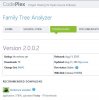
The new version 2 of FTAnaylzer now has a much simpler "ClickOnce" installer. This will create a shortcut on your desktop and will auto install the program for you using Microsoft's Click Once technology. It also means that the program will auto update the next time you run it. No manual downloads anymore just click and run.

trebor
LostCousins Member
AlexanderThe new version 2 of FTAnaylzer now has a much simpler "ClickOnce" installer. This will create a shortcut on your desktop and will auto install the program for you using Microsoft's Click Once technology. It also means that the program will auto update the next time you run it. No manual downloads anymore just click and run.
What am I doing wrong - the new version does not install at all - just loads of error messages - Win 8 is my system - is that the problem?
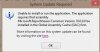
Windows 8 comes with .Net 4.5. Windows 7 comes with .Net 4.0 in order to be compatible with both I needed to use .Net 4.0 so you need .Net 4.0 installed. There is a link on the install instructions. I'll update them for Windows 8.
You are now working properly?
You are now working properly?