
-
Only registered members can see all the forums - if you've received an invitation to join (it'll be on your My Summary page) please register NOW!
-
It's easier than ever before to check your entries from the 1881 Census - more details here
You are using an out of date browser. It may not display this or other websites correctly.
You should upgrade or use an alternative browser.
You should upgrade or use an alternative browser.
Can you edit your cookies?
- Thread starter peter
- Start date


PhilGee
LostCousins Member
If it is on the page: https://www.findmypast.co.uk/cookies-policy I get a standard header line with "Cookie Settings" a quarter page down on an otherwise blank page and, whilst the pointer changes to imply a link the HTML consists of:
<div id="cookieOptionsWrapper"><button id="ot-sdk-btn" class="ot-sdk-show-settings">Cookie Settings</button></div>
so there is no link to follow.
Using Firefox 102.0.1
<div id="cookieOptionsWrapper"><button id="ot-sdk-btn" class="ot-sdk-show-settings">Cookie Settings</button></div>
so there is no link to follow.
Using Firefox 102.0.1
A
At home in NZ
Guest
I wasn't logged in to FMP and thought I'd do it the long way round to see what happens.
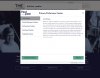
I selected a link from Google which took me to the log in page, I got a pop up to say 'but first, Cookies'. with two choices Edit Cookies and That's Fine.
I selected Edit cookies and got the attached which is similar to what I've seen in other websites (don't ask me to remember which ones).
I think that is what you should see if you select the link you are presented with, if not I suggest the question should be asked.
I selected a link from Google which took me to the log in page, I got a pop up to say 'but first, Cookies'. with two choices Edit Cookies and That's Fine.
I selected Edit cookies and got the attached which is similar to what I've seen in other websites (don't ask me to remember which ones).
I think that is what you should see if you select the link you are presented with, if not I suggest the question should be asked.
Attachments

Heather
LostCousins Member
There is a Cookies Policy page at Findmypast with a button at the bottom which reads Edit my cookies. However nothing happens when I click the button - does it work for you?
I found the "cookie policy" which took me to "edit settings" but clicking on it gets me nothing.


Bob Spiers
LostCousins Superstar
Following Phil's link it opened momentarily to 'Cookie Settings' on an otherwise blank page, then the page changed to reveal the default cookie settings and then listed each cookie within 4 main headings: Strictly Necessary/Performance/Functional/Targeting.
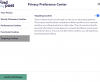
The Edit Settings button at the base merely allows you to 'Confirm my Choices' and either accept or reject by altering the 'blue' slider button under each heading (here is an example set to Targeting Cookies)
If you want to edit a particular cookie then you go back to the Settings page and select the cookie link you want to edit. Say for example Twitter.com. You click on its link which (from the few examples I chose for experimentation purpose) takes you to the cookie policy page of the item chosen, where you can Reject or Accept all as required.
I have no comments on doing the same from within FMP and not even sure the above answers any question, but I merely followed through with Phil's link and took it from there.
I was using Opera first off but got the same responses using Chrome.
The Edit Settings button at the base merely allows you to 'Confirm my Choices' and either accept or reject by altering the 'blue' slider button under each heading (here is an example set to Targeting Cookies)
If you want to edit a particular cookie then you go back to the Settings page and select the cookie link you want to edit. Say for example Twitter.com. You click on its link which (from the few examples I chose for experimentation purpose) takes you to the cookie policy page of the item chosen, where you can Reject or Accept all as required.
I have no comments on doing the same from within FMP and not even sure the above answers any question, but I merely followed through with Phil's link and took it from there.
I was using Opera first off but got the same responses using Chrome.
Last edited:
On Firefox, I saw the same as Phil.
On Chrome, I saw the "Cookies" page with a list of all the cookies, but greyed behind a confirm/edit cookies box. Edit settings in that brings up the same "Privacy preference Center" that Bob shows.
Going back to Firefox, I had trackers blocked and Google Tag Manager was listed as blocked. Enabling that and reloading that almost blank page gives the same as Bob describes - a pause, then the full "Cookies" page. Redisabling that tracker and reloading makes it go away again.
On Chrome, I saw the "Cookies" page with a list of all the cookies, but greyed behind a confirm/edit cookies box. Edit settings in that brings up the same "Privacy preference Center" that Bob shows.
Going back to Firefox, I had trackers blocked and Google Tag Manager was listed as blocked. Enabling that and reloading that almost blank page gives the same as Bob describes - a pause, then the full "Cookies" page. Redisabling that tracker and reloading makes it go away again.
Last edited:

When I followed the link from PhilGee's post it took me to the same Cookie page I was already on in another browser tab, but with Edit Settings functional (though I didn't make any changes). Going back to the previous tab it was still non-functi0nal - until I refreshed the page. All this was in Chrome.
In Edge I still had the Cookie page open with a non-functional button; again refreshing the page solved the problem.
It could be that Findmypast spotted the problem overnight and fixed it.....
In Edge I still had the Cookie page open with a non-functional button; again refreshing the page solved the problem.
It could be that Findmypast spotted the problem overnight and fixed it.....