
• Only registered members can see all the forums - if you've received an invitation to join (it'll be on your My Summary page) please register NOW!

  • If you're looking for the LostCousins site please click the logo in the top left corner - these forums are for existing LostCousins members only.
  • This is the LostCousins Forum. If you were looking for the LostCousins website simply click the logo at the top left.
  • It's easier than ever before to check your entries from the 1881 Census - more details here

Help Needed!!

Tim
I use and have used The Master Genealogist for some considerable time. It is easy to import & export files including gedcom file from the main menu by clicking on 'File' then 'Import' or 'Export' and following the instructions via the relevant wizard. As to creating a Lost Cousins Fact, I am at a loss apart from the fact that one could add it as a 'Tag' in the 'Details' window.
Hope this helps, Neville


Hi Neville,

Thanks for your post. I have added some documentation here, would you be able to check it out to see if it makes sense?
 
I have been using .paf 5 as my 'main' tree, and am looking at other progs. to upgrade to. Currently I am trying out Roots Magic, it is quite similar but many of the features are only available by purchasing the upgrade. Problem is, the .paf tree display is so 'neat' and uncluttered (I find windows type tree progs. are too 'busy'), so I am wondering if there is provision to add census fact, etc. to use FTA . At present my census info is recorded as notes.
 
Hi Emjay,

I've added documentation for Roots Magic on the FTA website here. Please give it a go and see if it works for you.
 
Tim, Thanks for that info for Roots Magic. Back to PAF 5 question.....how to enter a custom fact...Lost Cousins/Census. Exporting a GEDCOM file was very straight forward to
FTA , even for an I.T. novice like me.
 
Hi Emjay,

If you can post your steps here on how to create a Lost Cousins fact and export the gedcom file, then I will add it to the documentation for FTA.
 
PAF has been discontinued and is no longer supported. See here. I thought I had an old downloaded installer but I must have deleted it so can't help with instructions.
 
PAF has been discontinued and is no longer supported. See here. I thought I had an old downloaded installer but I must have deleted it so can't help with instructions.
Thanks Norman, after some searching and experimenting I am having a degree of success with PAF 5 ,in the edit person dialog box -click 'options' - then 'New Attribute' and so on. I will post full instructions for Tim when I have mastered it!
 
Hi Neville,

Thanks for your post. I have added some documentation here, would you be able to check it out to see if it makes sense?


Tim
Sorry for the slow response. Been trying out the instructions for accuracy etc. Pleased to report all seems OK. However, noticed a couple of anomalies, both in the Census and Lost Cousins tab, - drop down box inoperable, cannot scroll down if window is greater size than screen and the Ahnentafel Numbers don't tie in (unless you are using another system) for example, my 3xGGrandfather AN 46 comes out as 142!?

Regards, Neville
 
Tim
Sorry for the slow response. Been trying out the instructions for accuracy etc. Pleased to report all seems OK. However, noticed a couple of anomalies, both in the Census and Lost Cousins tab, - drop down box inoperable, cannot scroll down if window is greater size than screen and the Ahnentafel Numbers don't tie in (unless you are using another system) for example, my 3xGGrandfather AN 46 comes out as 142!?

Regards, Neville

Thanks for trying out the instructions.

On the Ahnentafel Numbers, can you just quickly check who is set as the root person?
You can set the root person in the individuals tab, by right clicking on a person.

It maybe that the root person is set to someone else.
 
Tim
Sorry for the slow response. Been trying out the instructions for accuracy etc. Pleased to report all seems OK. However, noticed a couple of anomalies, both in the Census and Lost Cousins tab, - drop down box inoperable, cannot scroll down if window is greater size than screen and the Ahnentafel Numbers don't tie in (unless you are using another system) for example, my 3xGGrandfather AN 46 comes out as 142!?

The Ahnentafel numbering will indeed be as Tim suggests the wrong root person. When you load your file it tells you who the root person is. If that isn't you then the Ahnentafel numbers won't be relative to you and the various relation types displays may not appear as you expect.

I'm struggling to understand your other errors though. The Lost cousins tab doesn't have a drop down box so its perhaps not surprising that it is inoperable on that tab? :) I'm guessing you perhaps don't mean on the Lost Cousins tab but instead when you click to view a report? Exact instructions on how to reproduce the error or a screenshot would help a lot.
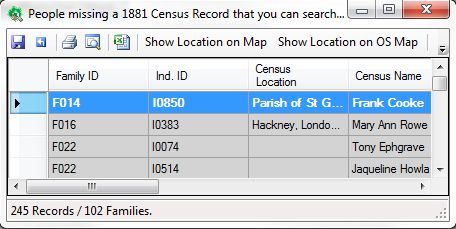
Similarly for the scrolling issue knowing exactly what screen you are talking about would help then I can fix the issue.
 
The Ahnentafel numbering will indeed be as Tim suggests the wrong root person. When you load your file it tells you who the root person is. If that isn't you then the Ahnentafel numbers won't be relative to you and the various relation types displays may not appear as you expect.

I'm struggling to understand your other errors though. The Lost cousins tab doesn't have a drop down box so its perhaps not surprising that it is inoperable on that tab? :) I'm guessing you perhaps don't mean on the Lost Cousins tab but instead when you click to view a report? Exact instructions on how to reproduce the error or a screenshot would help a lot.

Similarly for the scrolling issue knowing exactly what screen you are talking about would help then I can fix the issue.


Alexander

Tim's suggestion was indeed correct with the Ahnentafel numbers. All's well now I've reset the root person to myself. The other error I tried to explain is with the 'Census' and 'Lost Cousins' options on the main menu. If the program brings up a large number of records, there doesn't appear to be the facility to read them all. For example, when I ran the program for the first time, it brought up 186 Records/94 Families. With no scroll down facility, I could only read 36 records. Procedure to show problem - <Census> then <Show Missing from Census>; also <Lost Cousins> then <1841 England and Wales Census> (for example).
 
Just updated to latest version and tried to replicate your problem. I couldn't replicate the problem using Windows 7 64bit. There are two scroll bars. Can you re-size the window by grabbing the bottom and/or right hand edge? Does this force the scroll bars to appear?

capture39.jpg
 
Just updated to latest version and tried to replicate your problem. I couldn't replicate the problem using Windows 7 64bit. There are two scroll bars. Can you re-size the window by grabbing the bottom and/or right hand edge? Does this force the scroll bars to appear?

capture39.jpg


Norman

Thanks for your interest. I too use Windows 7 64 bit but no matter how I resize the window, I cannot get the vertical scroll bar to appear. The horizontal scroll bar appears but only with left hand adjustment. But that doesn't matter as much as there's no data hiding. Odd yours seems to be working OK. Looks like there's a slight glitch or maybe I'm 'doing' something wrong?
 
I can't think why that might be happening I'll have a look at the census form code to see if the scroll bar code is faulty. I've never encountered the problem myself I've got a few thousand people and can scroll without problem. However there is obviously something subtly going wrong so I'll investigate, any further information you can give eg: screenshots of it not working would help.
 
Tim, note that VTinOz has indicated use of another program not on the list "Relatively Yours 3". We should add a category for instructions for that and perhaps VTinOz can assist with instructions once they get the date errors they are seeing fixed.
 
Tim, note that VTinOz has indicated use of another program not on the list "Relatively Yours 3". We should add a category for instructions for that and perhaps VTinOz can assist with instructions once they get the date errors they are seeing fixed.

Sounds good. Can they post them here please?
 
Hmm not sure, the program was last updated 4½ years ago and doesn't appear to adhere to GEDCOM standards for dates, until I get some clarification that the date issue isn't a show stopper I'm not rushing to add this to the list.
 
Alexander

Tim's suggestion was indeed correct with the Ahnentafel numbers. All's well now I've reset the root person to myself. The other error I tried to explain is with the 'Census' and 'Lost Cousins' options on the main menu. If the program brings up a large number of records, there doesn't appear to be the facility to read them all. For example, when I ran the program for the first time, it brought up 186 Records/94 Families. With no scroll down facility, I could only read 36 records. Procedure to show problem - <Census> then <Show Missing from Census>; also <Lost Cousins> then <1841 England and Wales Census> (for example).

Hi Neville,

Can you post a couple of screenshots please that show the missing scroll bars?
e.g. a screenshot before you run the report and a screenshot of the report with the missing scroll bars.

To take a screen shot, press ALT+PrtScn, and then paste (or CRTL+V) into any image editor, save the file and then use the "Upload a File" button just below the reply box.
 
Hi Neville,

Can you post a couple of screenshots please that show the missing scroll bars?
e.g. a screenshot before you run the report and a screenshot of the report with the missing scroll bars.

To take a screen shot, press ALT+PrtScn, and then paste (or CRTL+V) into any image editor, save the file and then use the "Upload a File" button just below the reply box.

Hi Tim, instructions such as these are so useful to those of us who are not so competent with I.T. :)...but too afraid to ask:eek:
 
Hi Tim, instructions such as these are so useful to those of us who are not so competent with I.T. :)...but too afraid to ask:eek:

Hi Emjay,

Just ask, as my Dad used to say (and now I say it to my kids), "If you don't ask, you don't get". :)

Remember that we all had to learn at sometime.
 
Back
Top