
-
Only registered members can see all the forums - if you've received an invitation to join (it'll be on your My Summary page) please register NOW!
-
It's easier than ever before to check your entries from the 1881 Census - more details here
You are using an out of date browser. It may not display this or other websites correctly.
You should upgrade or use an alternative browser.
You should upgrade or use an alternative browser.
AncestryDNA’s new BETA
- Thread starter jorghes
- Start date

Helen7
LostCousins Superstar
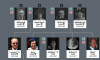
As Tim said, it looks like the tree owner has added the symbol in the Suffix field of each direct ancestor. I hadn't seen this effect before, but I just tried it for one of my ancestors and it showed up in my tree in the way you have illustrated. It could be any symbol, not necessarily a heart or triangle. Not sure how you access symbols on a PC but they are directly available from the Character Viewer on my Mac, so easy to put into the suffix field (after last name) of the 'quick edit' window for any individual.How would the tree owner have added those symbols - I can't see any way of adding them to my own tree?
There may be another way of getting Ancestry to mark selected ancestors this way, other than by manually editing the Suffix field, but I can't see it at the moment. (the 'direct ancestor' tag in MyTreeTags doesn't seem to produce a symbol in tree views).
Last edited:

It's not my tree, it's the public tree of a distant relative. How would the tree owner have added those symbols - I can't see any easy way of adding them to my own tree? I was hoping it was a new Ancestry feature in beta test
In Quick Edit, there is a suffix field. When you type ALT+3 you get a heart symbol. Make sure you have numer lock on and only use the numeric keypad.


canadianbeth
LostCousins Star
I just checked a couple of trees to which I have access and the owners there have not done this. It sounds interesting if that is what the symbols mean.
Helen7
LostCousins Superstar
So that's how it's done in Windows, assuming you have a numeric keypad (doesn't apply to Mac where you can select any symbol directly). But I agree with Peter, it would be good if Ancestry could provide a way of automatically indicating direct ancestors. I notice some people put their direct ancestors in capital letters to make them stand out.In Quick Edit, there is a suffix field. When you type ALT+3 you get a heart symbol. Make sure you have numer lock on and only use the numeric keypad.
View attachment 1583
No numeric keypad on my laptop..... but what this experience indicates is that there's an opportunity for Ancestry to make trees much more useful by indicating which relatives are in the direct line of the home person.
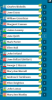
Are you sure Peter? Laptop Keyboard

Yes, I'm sure - I don't even have a NumLock key.Are you sure Peter? Laptop Keyboard
Last edited:
The Suffix field is intended to be used for descriptions such as Jr, III etc. But those are used so infrequently in Britain that repurposing the field seems like a good idea - provided it doesn't confuse the Ancestry system. There are plenty of symbols on a normal keyboard that could be used, eg the caret (^).
Marking relatives who emigrated would be another good use of the suffix field.
Marking relatives who emigrated would be another good use of the suffix field.

Bob Spiers
LostCousins Superstar
Yes I have always used CAPS to pick out direct ancestors and find this quite sufficient. However, Tribal Pages (TP) uses a series of 6 colour tags to identify direct & bloodline relationships to me as the Home Person, or whoever I nominate as Home Person in my other Trees. Different colours to pick out ancestors and descendants. This can be very useful, including the absence of any colour where no such relationship exists.I notice some people put their direct ancestors in capital letters to make them stand out.
The important thing is for there to be consistency - if everyone has a different system then it isn't going to help other users, and could be counter-productive.Yes I have always used CAPS to pick out direct ancestors and find this quite sufficient. However, Tribal Pages (TP) uses a series of 6 colour tags to identify direct & bloodline relationships to me as the Home Person, or whoever I nominate as Home Person in my other Trees. Different colours to pick out ancestors and descendants. This can be very useful, including the absence of any colour where no such relationship exists.
For example, I still don't know what the triangles meant in the original example - they're certainly not the direct ancestors of the home person.
I'm surprised. Not even when you have to press the Blue Fn key first?Yes, I'm sure - I don't even have a NumLock key.
There is no key with Num Lock printed on it, and there are no keys which obviously double as a numeric keypad - not that I've needed them before.I'm surprised. Not even when you have to press the Blue Fn key first?
Bob Spiers
LostCousins Superstar
Sorry, I am not concerned what others do in Ancestry, I just use CAPS for my direct ancestors (as do many others for that matter), which satisfies my requirements. What others do is down to them and if we wait for Ancestry to cotton on to colour coding (like Tribal Pages) or symbolic hearts and triangles, then we are in for a long wait.The important thing is for there to be consistency - if everyone has a different system then it isn't going to help other users, and could be counter-productive.
Last edited:
Bob Spiers
LostCousins Superstar
I have not long had a session sorting out my daughter's laptop which also had no keypad, Num Lock, or the 'makeshift' DIY keypad mentioned by Tim (an abomination at best). Having to enter numeric characters a fair number of times I asked her why she chose a model without a separate keypad? Her answer "I don't need one there are numbers along the top...besides those with key pads were too big and bulky". I know when I am beaten so didn't pursue the matter further.There is no key with Num Lock printed on it, and there are no keys which obviously double as a numeric keypad - not that I've needed them before.
That's the sort of public-spirited response we've come to expect from you, Bob!Sorry, I am not concerned what others do in Ancestry
As someone who grew up with typewriters I'm perfectly happy using the numbers across the top - a numeric keypad would be very low on my list of priorities, especially since I'd have to put the mouse down in order to use it. The one laptop I have with a numeric keypad weights as much as the other three combined.I have not long had a session sorting out my daughter's laptop which also had no keypad, Num Lock, or the 'makeshift' DIY keypad mentioned by Tim (an abomination at best). Having to enter numeric characters a fair number of times I asked her why she chose a model without a separate keypad? Her answer "I don't need one there are numbers along the top...besides those with key pads were too big and bulky"