• Only registered members can see all the forums - if you've received an invitation to join (it'll be on your My Summary page) please register NOW!

  • If you're looking for the LostCousins site please click the logo in the top left corner - these forums are for existing LostCousins members only.
  • This is the LostCousins Forum. If you were looking for the LostCousins website simply click the logo at the top left.
  • It's easier than ever before to check your entries from the 1881 Census - more details here

Family Tree Maker to be pensioned off. NOT!

The Family Historian User Group provides a variety of support functions, including an active forum: https://www.fhug.org.uk/forum/

Perhaps directing people to this may be better in this case?
Not necessarily - most popular programs have support forums, but they're inevitably a bit insular, not to say biased. LostCousins members use a wide range of different programs, so will often be in a better position to help or advise, especially where there are implications related to FT Analyzer or LostCousins.
 
Bob thanks for mentioning Genopro I had not come across it and it seems very interesting
Hi Adrienne, Peter has mentioned Genopro many times and I think uses it exclusively and would certainly be the best person to explain its workings. I checked it out after one such mention and fell in love with the ease it allows one to manually create graphical Tree charts and customise in all sorts of ways. For this it is second to none. I have produced dozens of charts for the family and although I also produce a textural hierarchal chart, the graphical version wins every time.

To be truthful that is only part of its use and although I never took to Genopro as a desktop FH database - despite that being its main purpose -others may feel different. As we know, people have particular likes and dislikes which is why it is such a good idea to list the main FH programs and let regular users explain things for the benefit of others.
 
No, Tim is the expert - I've only scratched the surface.
Lol, I think Bryman is the true expert now!

Bob, I don't believe GenoPro was developed as a Family History Tool, however what was there did lend its self to Family Relationships, and hence Family History. It is as you mentioned, very easy to create charts, have different branches on different tabs and so everything is very clear and simple.

I stopped using it as it didn't support the gedcom format too closely, and couldn't create all the facts that I needed to, and report on them. And I do miss the search tool though, put in part of a word and it would tell you every location in any field that it found it. Useful when you remember a name, or part of an address and want to know if you loaded it as a note or somewhere else.

But on the whole, I'm glad I moved to a bespoke Family History program.
 
I think Bryman is the true expert now!

I don't consider myself an expert but certainly an experienced user that is happy to pass on advice and experience if anyone asks. I have also requested (and received) amendments, particularly relating to the reports generation, which can be useful additions for LostCousins members wishing to make better use of FTA in conjuction with GenoPro.

I particularly like the user configurable relationship charts and the easy way that they can link between individuals/branches and even separate trees with a single click.

There is a new version which has been completely rewritten but I have stayed with the earlier version as there are very few problems that I have encountered and it meets my needs.

Sorry if I am a bit late coming in to this conversation but Summer is rapidly approaching here in NZ and genealogy is having to take less priority. A foal is due to be born in a couple of weeks and my son is also getting married at a local vineyard in February so the next few months will be rather busy for me making appropriate changes to the house and surroundings in preparation for family visitors from UK.
 
Not yet sure about missing media/citation and will have to discover how one finds this out).

To find out if media is missing, look at the media count in Ancestry either in your home page or in the tree overview. Look at the Media tab in FTM, the count is at the bottom of the page. If the numbers do not match, go to Publish in FTM and select Media Reports from Publication Types then select the Media Usage report. Select All Individuals untick every box except Show divider between media items and Show unlinked media. It will more than likely be the unlinked media that is causing the mismatch in numbers.
 
Well I've been to Ancestry homepage and manage tree and there is no mention of media count anywhere. I do seem to have some unlinked images which I can work through, but my biggest concern is a message I get on FTM which says "Media: 8 not complete - process error".

Unfortunately it won't tell me what the 8 bits of media are!
 
To find out if media is missing, look at the media count in Ancestry either in your home page or in the tree overview
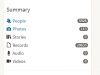
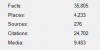
Thank you for that. It took me a while to follow your instructions for Ancestry until I realised you meant the Tree overview found on the 'Create & Manage Tree' page and selecting the 'Tree Overview of the appropriate Tree (I have more than one). But then came the tricky bit because although I can find the FTM Media count (which happens to be 2572 Media items) there is nothing remotely the same in Ancestry. Ancestry tells me the number of People and Photos (I have modest 61 photos as I limit such in Ancestry), some 5 stories and 6423 Records -No audio: No video. (It then goes on to show the number of Hints under various categories which is a separate issue)

Before I can proceed further I need to understand what constitutes Media in Ancestry and FTM as they do not appear to talk the same language. So would appreciate you explaining this again please and then perhaps I can follow through and see what I can make of your further advice to be carried out in FTM.
 
Last edited:
Bob, I would imagine that as far as Ancestry are concerned media doesn't include anything on their site (because that is just a link), only images and documents that you have uploaded yourself (either directly or via FTM).
 
This is all I have on Ancestry,

upload_2017-11-23_17-49-56.png

and this is from FTM

upload_2017-11-23_17-51-53.png

It's like comparing apples and bananas!
 
t's like comparing apples and bananas!

I think you'll find the difference is because you don't sync your trees. I assumed you did, that's why I jumped in with my threepence worth.
Media in FTM and in Ancestry are almost the same, in FTM the Media tab includes all photos and stories that are attached to the tree.

There is a whole section in the Help file in FTM about Media, it tells you which type of media do not sync. To see it, select the Help button then select Help for Family Tree Maker. A separate window pops up and down the left hand side of that is 'Media'.

I only use jpg files for my trees which means they are classified as photos and I find them much easier to see and handle. But, that's personal choice.

I hope I haven't muddied the waters even more...
 
It's like comparing apples and bananas!
Agreed, and my Ancestry list is in the same order as your own Tim and I am sure FTM will likewise follow suit once I discover how to get at the information you show. (I found the media content at the bottom of the page under the Media tab much as 'AhinNZ' explained). I am still a comparative novice with FTM I'm afraid but will get there in the end as I always do.
 
Of course I sync my trees! There would be no point in using FTM if you didn't!

Here's Ancestry
upload_2017-11-24_10-31-25.png

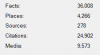
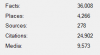
Here's FTM
upload_2017-11-24_10-33-28.pngupload_2017-11-24_10-31-51.png

Are you able to show me where the media count is on Ancestry? Because I can't find it.
 

Attachments

  • upload_2017-11-24_10-32-49.png
    upload_2017-11-24_10-32-49.png
    4.8 KB · Views: 4
I think you'll find the difference is because you don't sync your trees
Well you are wrong on that score as that is something -indeed my main reason for using FTM - to Sync with Ancestry...at least when it allows because of late that has not been possible because of the seemingly constant Orange and Red 'weather' reports.

I hope I haven't muddied the waters even more...
No the waters remain muddy at the same level as before and I do not expect things to change until I fully understand what constitutes media...

Media in FTM and in Ancestry are almost the same, in FTM the Media tab includes all photos and stories that are attached to the tree.
...hence following your statement how media in Ancestry & FTM are the same even though common sense tells me FTM gets its media from Ancestry (I do not personally add anything to FTM myself so it is all one way). So why can there be differences once a Tree is synced and on a par with its Ancestry counterpart?

PS I will of course read the Help files as you suggest.
 
Last edited:
Back
Top