• Only registered members can see all the forums - if you've received an invitation to join (it'll be on your My Summary page) please register NOW!

  • If you're looking for the LostCousins site please click the logo in the top left corner - these forums are for existing LostCousins members only.
  • This is the LostCousins Forum. If you were looking for the LostCousins website simply click the logo at the top left.
  • It's easier than ever before to check your entries from the 1881 Census - more details here

Drawing simple family trees

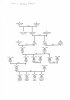
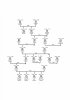
Didn't I? Sorry. I downloaded GenoPro and created a new family using the Family Wizard. I added the sons and daughters (the few I wanted), dates of birth, death and marriage. It was really very straightforward. I made a few false moves thanks to my click-happy fingers plus inability to read instructions properly but they were easily corrected. The only things I'd like to get rid of are the boxes or circles with age at death between dates and names as they take up so much room. Bob and Peter, or other GenoPro experts, do you know if that's possible? I've attached my final version so you see what I mean and so that other people will know what a beginner can achieve with GenoPro.
 

Attachments

  • Pemble family tree_scan.jpg
    Pemble family tree_scan.jpg
    73.8 KB · Views: 37
Thanks Gillian, it's looking good.

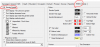
To remove the gender symbol (the circles and boxes), double click on a person, goto the Display Tab and remove the tick for the box called Gender Symbol.
Here, you can also select different background colours if you wanted to highlight someone.
You can see the results of what you're doing in the Preview screen.
upload_2015-4-1_10-42-7.png
 
Thanks a lot, Tim. I still have a lot of work to do in exploring all the possibilities offered by Genopro.
 
Tim, a great example of how Genopro excels in this area!
Hi Peter, GenoPro is great for displaying and laying out your tree, and some of its reports, just wish it was better on the data side.
 
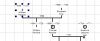
Tim, I've now done what you said and got rid of the gender symbol. However, that doesn't really help because now there's a space where the symbol used to be so the area covered by a person with dates is still the same. I've been through all possible (and impossible) tabs but can't work out a way of squeezing up name and dates. upload_2015-4-1_13-15-42.png
See what I mean?
 
Ah well, never mind. Thanks all the same. Next question - probably also unsolvable: is it possible to swap the positions of names and dates so date comes underneath name?
 
but can't work out a way of squeezing up name and dates
I can't eliminate the gap, but you can squeeze up the entries quite a lot by putting the name on one line instead of two or more (see Name Format, bottom left of Properties).
 
Thank you, Peter. I've now squeezed up the entries as you suggested PLUS I've worked out a way of eliminating the gap by putting the surname in the 'middle name' box and the dates in the 'surname' box. HOWEVER, it makes no difference to the total area used by the table, which I guess is set in stone. Anyhow, see attached, where the top half of the table is according to my squeezed system and the bottom half is as Genopro wants it.
 

Attachments

  • Pemble family tree_c.jpg
    Pemble family tree_c.jpg
    72.4 KB · Views: 25
Just seen emjay's idea. I'm almost sorely tempted. However, here's a better version of my squeezed system. In the earlier one I'd forgotten to put the names on two lines. Now it looks quite neat I think except, of course, that the total area is the same.
 

Attachments

  • Pemble family tree_d.jpg
    Pemble family tree_d.jpg
    69.3 KB · Views: 20
Gillian, did you realise you can squeeze the individuals up using the mouse (ie hold the left mouse button down)?
 
Gillian, did you realise you can squeeze the individuals up using the mouse (ie hold the left mouse button down)?
No, I didn't. But now I've squeezed that way, too, and finally I think my tree has shrunk to a size that the journal will be able to handle. I must count grids and see if the total area is smaller.Once again, thank you so much Peter and Everyone. Where would I be without Lost Cousins!? :)
 
Ask Bob's wife to draw your tree "free-hand" ? ("kerchung!", says Bob;))
Sorry but there's a queue of one ahead - me!:) Mind I speak of a full blown chart (well two to be precise) for which I acquired the special large size paper and pens. I used Genopro to chart each member with name & dates (Paternal & Maternal) back to Great x 3 Grandparents and I discussed how I wanted the layout to look which she rough sketched. I then awaited the 'spare moment' promised. It was to be during the winter, but unfortunately I did not tie her down (figuratively speaking) to which one?:oops:
 
Once again, there's no icon for replying to Bob's message. So I'll have to use a smiley instead :D Re queue, Bob, you just stay put. I won't have to join you because I'm very happy with the GenoPro chart I now have. Except. Is there a way of bolding people's names, simply the names, so that they stand out. At the moment I've put boxes round the important people - in seven generations but I think bold names would look neater.
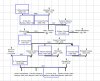
 
Is there a way of bolding people's names, simply the names, so that they stand out. At the moment I've put boxes round the important people - in seven generations but I think bold names would look neater.
Sorry can't think of a way of making the font Bold in Genopro, but others may know how. I have tried using BB codes and HTML, even ctrl B - and even as a last resort copy pasting a bold name into Genopro but it always reverts to normal. When I want to make someone stand out I apply a colour (even a slight tint) to the box via Display/Deep background. You can choose your own shade by clicking more colours. Other than that check the Genopro help page here fonts which may show the wayo_O
 
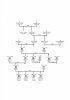
Thanks, Bob. Actually, I had already outlined my boxes more or less as you suggest, only with Display/Border and Background, and the tree certainly looks very pretty but the boxes are a bit too big in my squeezed up tree, which is why I thought bolding would be a better way of distinguishing the 9 people in 7 generations my article is about. Perhaps you can see what I mean in my attachment. Or do you think I'm being too fussy? I looked up fonts but there doesn't seem to be a way of changing only certain names.
 

Attachments

  • Pemble family tree_boxes.JPG
    Pemble family tree_boxes.JPG
    67.9 KB · Views: 20
Don't be too fussed about icons Pauline, a smiley will do if none of the presets work for you.:rolleyes:

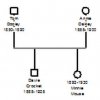
Back to your dilemma of sorts, don't you think removing the outline boxes is better (taking up less room) and playing around with inserting names/dates in boxes not intended for same; such as my illustration

where you can see the daughter is shown with dates first and names second if the more conventional does not suit.

You can scale in Genopro or as I did when writing my story, copy/pasted into Word and then used the scaling outline box to make it fit the allotted space. Just a thought anyway.
 

Attachments

  • Genpro example-1.jpg
    Genpro example-1.jpg
    7.4 KB · Views: 24
Last edited:
Back
Top