

The My Contact page (reached by clicking on the name or initial of the person you've been matched with) has been a key source of information since it was introduced in January 2008. However, for many years after that the information shown was quite limited - it simply listed the names of the relatives you shared with the other member, and gave the relationship that each of you had entered.
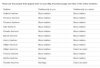
In 2013 a Match Rating was added - this summarises the relationship between you and the other member, ie whether you are cousins, related by marriage, or connected in some other way.
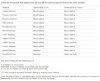
This week the information shown has been enhanced substantially - the census references and age are now shown for each of the relatives listed, and they are listed in the same order as they appear on your My Ancestors page (when it is sorted by Household, as it should be most of the time).
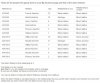
Whilst the census isn't identified (there isn't space), this information isn't really needed - just copy the census references, open your My Ancestors page in another browser tab (or window), then paste the references into your browser's search box. This will instantly locate the household (assuming you've chosen the Household sort) and if there's an arrow shown you can click it to look up the census entry.
I hope you find the new format helpful.
In 2013 a Match Rating was added - this summarises the relationship between you and the other member, ie whether you are cousins, related by marriage, or connected in some other way.
This week the information shown has been enhanced substantially - the census references and age are now shown for each of the relatives listed, and they are listed in the same order as they appear on your My Ancestors page (when it is sorted by Household, as it should be most of the time).
Whilst the census isn't identified (there isn't space), this information isn't really needed - just copy the census references, open your My Ancestors page in another browser tab (or window), then paste the references into your browser's search box. This will instantly locate the household (assuming you've chosen the Household sort) and if there's an arrow shown you can click it to look up the census entry.
I hope you find the new format helpful.
